Give your notch a job.
A Dynamic Island for your Mac. Ledge Vale by Vorelci lives in the notch of your MacBook and turns the black strip around your camera into a small live screen. Music, AirPods, a shelf for files, a focus timer and your battery, right where your eyes already go.
The paid direct edition is being prepared. Checkout and its matching trial download are not live yet.
This is a Mac app. Open this page on your Mac to download it.
17 seconds, no sound: music, the file shelf, the focus timer, battery and AirPods, and your week. An animation drawn to match the app, not a screen recording.
Paper Trail follows an illustrated lake study from the desktop to the Mac notch. Put Back returns the file to its original folder. 15 seconds, silent.
Everything lives right by the camera.
Hover to open it, move away to close it. Click to keep it open. When something happens, it says so and gets out of the way.
-
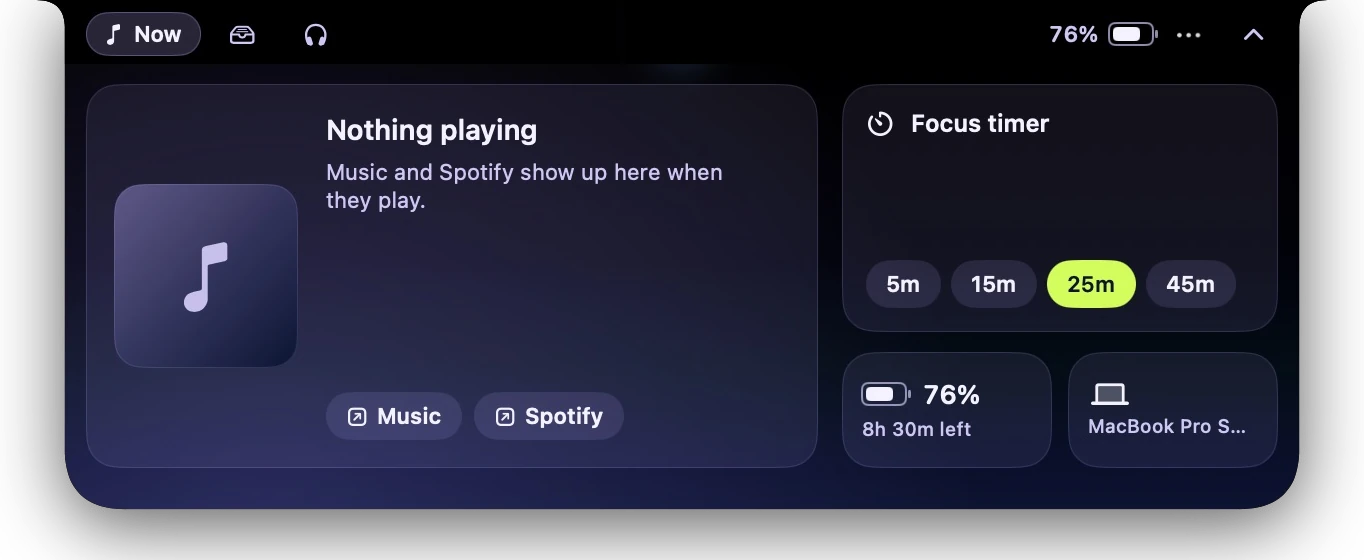
See what's playing in Apple Music or Spotify, with artwork and a little equalizer beside the camera. Hover for play, pause, skip and a scrubber.
-
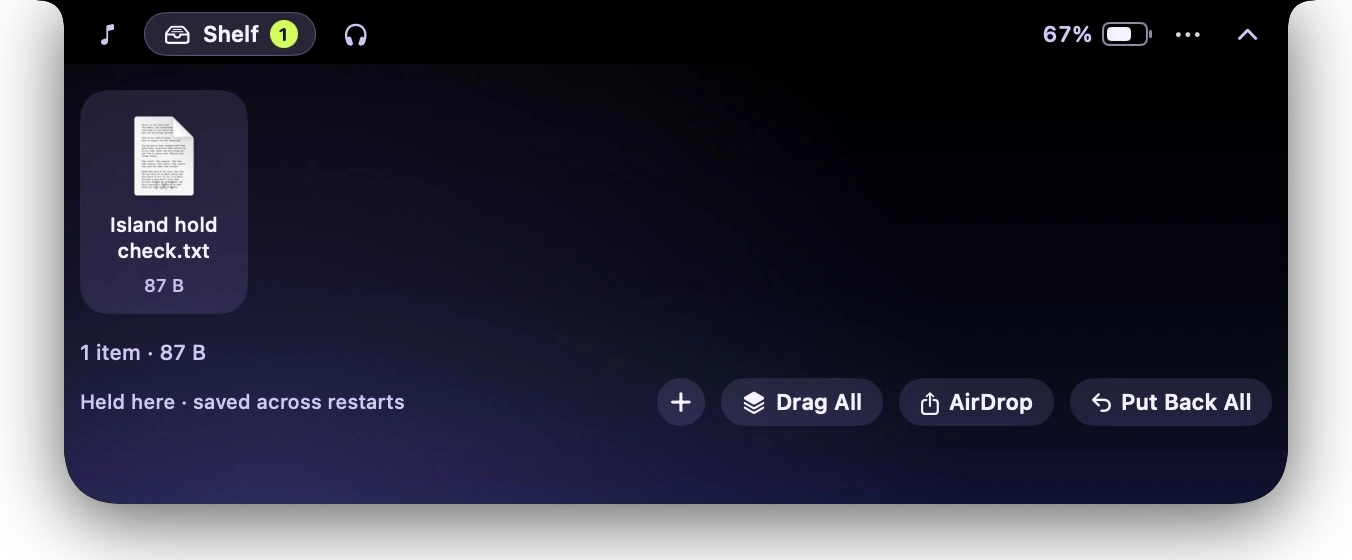
Drag files onto the notch to hold them while you find where they go. The island holds the actual file, keeps it through restarts, and puts it back in its original folder when you ask.
AirDrop and dragging into other apps share a copy, so the held file stays put.
-
When AirPods connect, a banner shows left, right and case battery. Connect or disconnect any paired accessory from the notch.
-
Switch between speakers, AirPods, a display or AirPlay, and set the volume or mute in the same place.
-
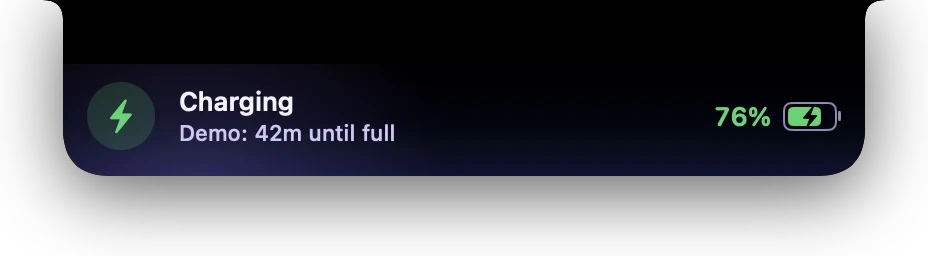
Banners when you plug in, unplug, run low or finish charging, with time to full or time left whenever macOS knows it.
-
Pick 5, 15, 25 or 45 minutes. The countdown sits next to the camera, with pause, +5 and stop, and “Time's up” when it ends.
-
A green dot while a camera is on, orange while a microphone is.
Microphone detection needs macOS 14.2 or later.
Real screenshots, from a real MacBook.
Captured on Rishik's MacBook Pro. The app's colors have changed since these were taken.

Free for 2 days.
One payment of $19.99. Launch price; planned regular price $39.99.
- One-time purchase. One person, one Mac. Includes personal and work use.
- Not happy? Email us within 7 days of buying for a full refund.
- After the 2 free days Ledge Vale locks until you buy. Files you were holding can always be put back.
Download. Drag. Open.
The paid download must pass Developer ID signing and Apple notarization before release. It is still being prepared here.
Download the ZIP
Download Ledgevale.zip from this page. If Safari does not unzip it, double-click the ZIP in Downloads.
Drag it into Applications
Drag Ledgevale.app from Downloads into Applications. The file keeps that short name; the app is Ledge Vale by Vorelci.
Open it from Applications
macOS checks the download. If it asks whether to open an app downloaded from the internet, confirm only after checking that you downloaded the reviewed release from this page.
If macOS reports that the app is damaged, malicious or cannot be verified, stop and contact vorelci@gmail.com. Keep macOS security protections enabled.
Open it from Applications
Open Ledgevale.app. macOS checks its Developer ID signature and notarization. If verification fails, stop and contact vorelci@gmail.com rather than removing quarantine protection.
Optional SHA-256 check
The checksum must match the exact ZIP on the release page. A matching checksum does not replace the signature or notarization checks.
$ shasum -a 256 ~/Downloads/Ledgevale.zipCompare with SHA256SUMS.txt on the release page.
Your files stay on your Mac.
What it does
- No account, no ads, no analytics.
- Album art comes from Spotify. Spotify artwork loads from Spotify's own image server. Buying and licences are covered in the privacy notice.
- Public macOS features only. No hacks, no private APIs, nothing that breaks with an update.
- Two permissions, asked when needed. Bluetooth for AirPods, and Music or Spotify control the first time you use it.
- Quiet by default. Sounds stay off until you switch them on.
What it won't pretend to do
- Replace the volume and brightness pop-ups. That needs Accessibility access, and the app doesn't ask for it.
- Show notifications or calls. macOS has no public way to read other apps' notifications.
- Change AirPods noise control. There's no public way to do it, so the island links to Bluetooth settings.
- Control YouTube, Podcasts or browsers. It works with Apple Music and Spotify.
- Name the app using your camera. macOS only says that a camera is on.
Good questions.
What does it cost?
Free for 2 days. After that, Ledge Vale locks until you buy it: one payment of $19.99 (launch price; the planned regular price is $39.99), no subscription, no account. Files you were holding can always be put back.
Can I get a refund?
Yes. Email us within 7 days of buying for a full refund. The terms have the details.
Which Macs does it run on?
Macs with Apple silicon (M1 or later) running macOS 13 Ventura or later.
It's made for MacBooks with a notch, and it still works on other displays: the island drops down from the top center when something happens, and the menu bar icon opens it any time.
Why does macOS warn me about it?
Apple only skips that warning for apps it has notarized, and notarizing needs a paid Apple developer account. This build is signed by the person who made it, not yet by Apple, so macOS asks you to confirm once. After that it opens like any other app.
Where do files on the shelf go?
Dropping a file moves it into the app's own folder until you drag it out, use Move To… or Put Back. It stays there through restarts, and it never replaces a file that's already at the destination.
The folder is inside the app's own Application Support folder in your Mac's Library. It's storage, not a backup, so put files back before deleting the app.
Can I turn parts of it off?
Yes. The island's … menu has switches for opening on hover, music in the notch, device banners, charging banners, camera and mic dots, sounds, haptics and Launch at Login.
How do I update it?
Download the new version and drag it into Applications, replacing the old one. Files on the shelf stay where they are. macOS may ask for Bluetooth again, because each build is signed separately.
How do I remove it?
Open the shelf and click Put Back All first. Then quit from the menu bar icon and drag the app from Applications to the Trash.